
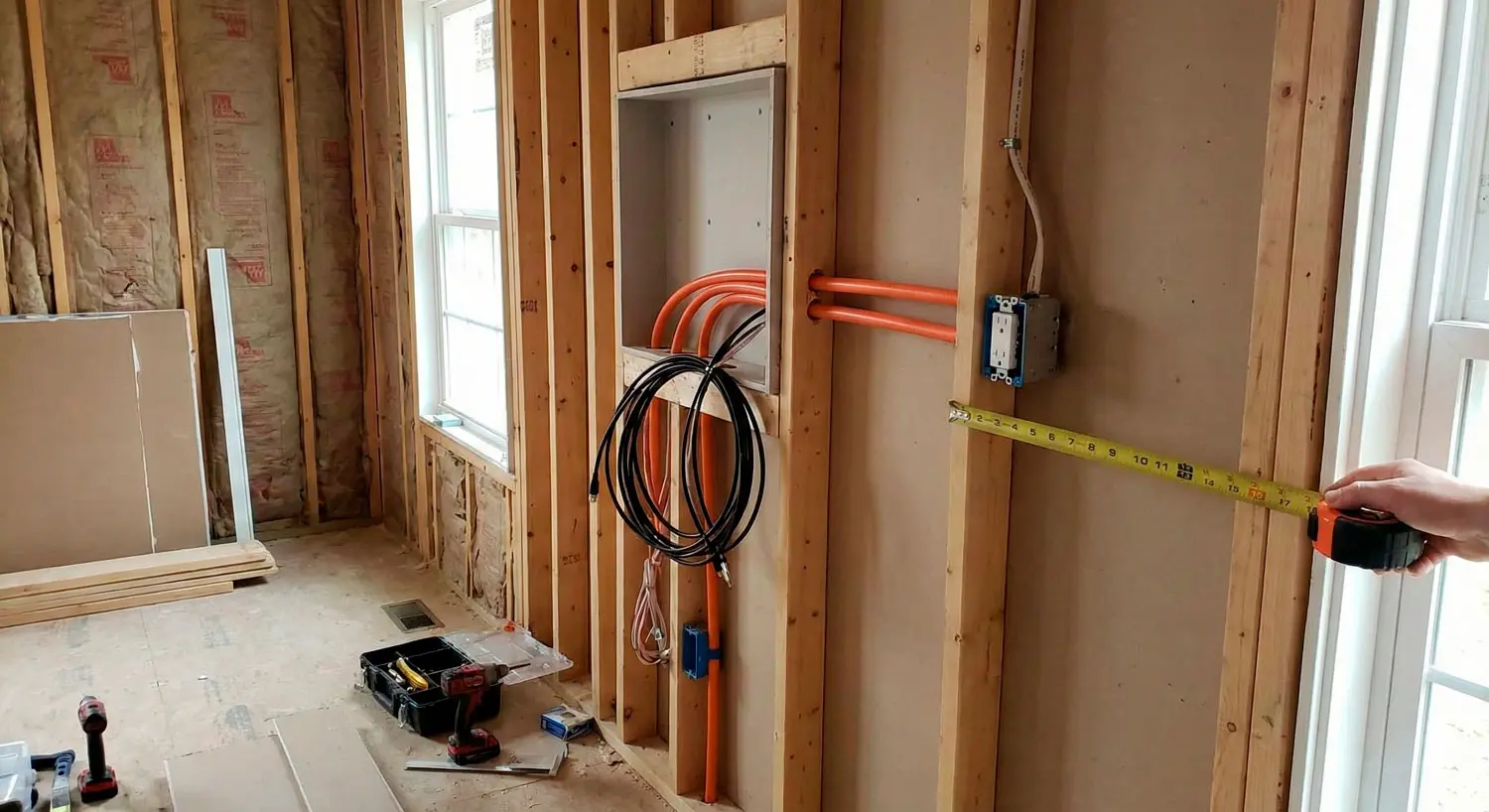
Once drywall goes up, every “we’ll figure it out later” TV wiring decision gets expensive fast. If your framing inspection just passed, you’re in the perfect moment to do this right: power where it belongs, low-voltage where it won’t get trapped, and a future-proof path for whatever devices you’ll want next. This guide lays out the exact decisions to make while the walls are still open—so your finished TV wall looks intentional, not improvised.
It’s better if you prewire your wall mounted TV the right way!
The pre-drywall window: what you can fix now (and what you can’t later)
Why drywall changes everything: access, cost, and compromises
In a new build (or a major remodel), prewire is one of the few moments where “clean” and “easy” are both true. You can stand in the room, see the studs, and route exactly what you need—straight, supported, and labeled—without cutting holes, fishing wire, or accepting visible cords as the price of convenience.
After drywall, the same improvements tend to fall into one of three categories:
- You live with visible wires and awkward device placement.
- You accept compromises (surface raceways, external conduits, “temporary” fixes that become permanent).
- You open walls, which adds cost, delays, mess, and coordination headaches.
That’s why this moment matters. If the goal is a wall-mounted TV that looks built-in, the plan has to be built in too.
The goal: a TV wall that looks built-in, not patched together
A “clean” TV wall usually means:
- No visible power cord.
- No visible HDMI cable or dangling accessory wires.
- No random outlet peeking out below the screen.
- No pile of devices stuffed behind the TV with no airflow.
- A setup that can be serviced without uninstalling half the wall.
You don’t need a complicated system to achieve that. You do need a coordinated plan between framing, electrical, and low-voltage before the walls close.
Start with the decision that drives everything: where will your devices live?
Before you talk about outlets or HDMI, decide where the “stuff” goes. That single choice determines cable routing, service access, heat management, and how future-proof your setup can be.
Behind the TV: clean look, but heat and access risks
Placing devices behind the TV can look very clean because everything is hidden. The downside is that it’s also the most common source of regret.
Common problems with behind-the-TV device placement:
- Heat builds up in a tight pocket with limited ventilation.
- Access is inconvenient—especially if a device needs a reset, a cable swap, or troubleshooting.
- The space becomes cluttered fast (streamer, cable box, power brick, HDMI adapters, control hubs).
- You end up removing the TV to service something simple.
If you do go this route, plan it intentionally: serviceability and ventilation can’t be an afterthought.
In a nearby cabinet/credenza: simplest service path
For many rooms, the best “clean + practical” solution is letting the TV be the TV, and putting devices in a nearby cabinet.
Why this often works well:
- You can reach devices easily without touching the TV mount.
- Heat is easier to manage.
- Cable changes are simple.
- You can expand or upgrade without reopening walls.
This approach usually depends on a clean low-voltage path between the TV wall and the cabinet, plus a plan for how control will work (more on that later).
In a structured wiring panel / AV closet: cleanest wall, most planning
In higher-end builds, especially when multiple rooms are involved, an AV closet or structured wiring location can be the cleanest long-term solution.
Benefits:
- The TV wall stays extremely minimal.
- Devices can be organized, ventilated, and serviced in one place.
- It supports upgrades without room-by-room disruption.
Tradeoffs:
- It requires more planning before drywall.
- Cable paths and labeling become critical.
- The “system” needs to be designed—not improvised.
If the build has a dedicated low-voltage strategy already, this option tends to integrate smoothly. If not, it can still be done—but it needs coordination now, not later.
Where to put outlets behind a wall-mounted TV (without regret)
Once device location is decided, power placement becomes straightforward. The goal is not “hide an outlet.” The goal is “power where it’s useful, without becoming visible or hard to service.”
“Hidden but reachable”: planning for serviceability
A hidden outlet that you can’t access is not a win. It often becomes the reason someone unmounts the TV just to reset a power adapter or replace a cable.
A practical mindset:
- Hide power behind the TV, but keep it reachable through a sensible access strategy (depending on your wall design).
- Avoid placing power where it will be blocked by the mount hardware or tightly pinched behind the screen.
- Consider what will actually be plugged in (TV power, soundbar power, streaming device power, network gear).
If you’re planning a recessed area or device bay, make sure it’s sized and placed for the real-world plugs and power bricks—not just an idealized diagram.
Recessed power kits vs standard outlets (what to ask your electrician)
Many homeowners assume a recessed power kit automatically solves “clean TV wall” problems. Sometimes it does. Sometimes it just relocates the clutter.
When coordinating with your electrician, focus on outcomes:
- Is the solution code-compliant for your jurisdiction and intended use?
- Does it keep the TV plug from being crushed or bent at a sharp angle?
- Does it allow service access without removing the TV?
- Does it separate high-voltage from low-voltage appropriately?
Because requirements vary by area and application, the safest approach is to coordinate with a licensed electrician and your low-voltage integrator so power and signal runs are planned together—rather than installed in isolation.
Plan for soundbar/powered accessories if relevant (TBD by room)
Many “clean TV walls” include more than a TV:
- A soundbar (often with its own power and sometimes network needs)
- An active optical HDMI cable adapter or power injector (depending on the system design)
- A small streaming device
- Sometimes a powered mount accessory or lighting
If the room is likely to include audio, plan power and cable paths accordingly. If audio scope is unknown right now, treat it as TBD and at minimum keep the wall flexible (conduit and thoughtful low-voltage paths help here).
Low-voltage essentials: HDMI, Ethernet, and control runs that actually work
This is where most prewires go wrong: the plan assumes one HDMI cable and “Wi-Fi will handle the rest.” In luxury builds, reliability and flexibility usually come from a few basic low-voltage decisions made early.
Why Ethernet still matters in luxury builds (even with great Wi-Fi)
Wi-Fi can be excellent—and still not be the best choice for every fixed device.
Reasons Ethernet still matters:
- It can make streaming and control more consistent for critical rooms.
- It reduces congestion on the wireless network.
- It gives you a known-good path for devices that don’t behave well on Wi-Fi.
- It supports future expansion without rethinking the network.
You don’t need Ethernet at every possible location to benefit. You do want Ethernet where it reduces future troubleshooting and improves predictability—especially for primary entertainment zones.
TV wiring box placement and cable management strategy
A “TV wiring box” (or structured low-voltage opening) can help with clean cable transitions, but placement matters.
Good planning questions:
- Where will the low-voltage wires enter the TV zone so they’re hidden by the screen?
- If devices live in a cabinet, where does the path exit the wall to reach that cabinet cleanly?
- If devices live in a closet, where do all low-voltage runs terminate, and how will they be labeled?
Cable management isn’t just aesthetics—it’s serviceability. A wall that looks clean but requires guesswork to troubleshoot later is a future headache.
Control considerations (IR, network control, or app-based ecosystems)
People often forget control. They plan video and power, then realize:
- the device is hidden in a cabinet and the remote doesn’t work reliably
- the equipment is in a closet and needs a control strategy
- there are multiple apps and no “simple” way for guests to use the system
Because AVI Group’s supported ecosystems are TBD, keep this portion system-agnostic:
- If devices are hidden, plan a control approach that doesn’t depend on “standing in the right spot” with a remote.
- If devices are centralized, plan for a control method that works room-to-room and remains guest-friendly.
The key is deciding now so wiring paths and device location support it.
Conduit behind the TV: your “future-proof” insurance policy
If you only add one “future” element before drywall, conduit is often the most forgiving. It doesn’t lock you into today’s cables. It creates a path for tomorrow’s changes.
When conduit matters most (device changes, HDMI revisions, new standards)
Conduit is most valuable when any of these are true:
- You expect to upgrade the TV size or capabilities in the future.
- You’re not finalizing all device decisions now.
- Your device location might change (behind TV today, closet tomorrow).
- You want an easier path for newer cables that may be thicker or less flexible.
The point isn’t to predict the future perfectly. It’s to avoid being trapped by drywall later.
Conduit path planning: bends, pull string, and termination points
Conduit only helps if it’s actually usable.
Practical planning principles:
- Keep the path as straight and gentle as possible.
- Minimize tight bends.
- Include a pull string.
- Terminate it where it will actually serve you (TV zone to cabinet, or TV zone to AV closet, depending on device strategy).
If you’re unsure about the best conduit path, prioritize the most likely future pain: “How do I run a new cable to where devices are without tearing into the wall?”
Common conduit mistakes that make it useless
Common failures:
- Conduit with too many bends (cables won’t pull cleanly).
- Termination points that are inaccessible after drywall.
- A conduit route that stops short of where devices actually live.
- No pull string, or a pull string that gets cut during construction.
The best conduit is boring: easy path, accessible ends, clearly labeled.
HDMI run length planning: how to avoid “it worked on the bench” failures
This is a frequent frustration in larger homes: a system works temporarily during setup, then becomes inconsistent once walls close and the real cable path is final.
Distance, routing, and why “long HDMI” isn’t always simple
HDMI is not just “plug and go” at any length or routing scenario. Longer runs can be less forgiving, and the build environment adds complexity: routing, interference, bends, and terminations.
Safe planning guidance:
- Don’t assume the shortest conceptual distance is the real distance.
- Route intentionally and avoid last-minute improvisation.
- If the TV is far from the device location, plan that path early.
Because exact limitations depend on cable type and system design, avoid hard numbers and focus on planning discipline.
When to plan for alternate transport methods (keep wording general/TBD)
In some builds, it can make sense to plan for alternate ways to deliver video if distances or routing constraints make standard approaches unreliable. Since exact methods and recommendations depend on the system and AVI Group’s preferred standards (TBD), keep this general:
- If your TV wall and equipment location are far apart, coordinate early with your integrator so the right approach is chosen for your path and distance.
- Don’t wait until trim-out to discover the run is complicated.
Test and label strategy before walls close
One of the most overlooked “premium” moves is documentation.
Before drywall:
- Photograph wire paths and termination points.
- Label runs clearly at both ends.
- If possible, perform basic continuity/verification checks as the system is staged.
Even if you’re not finalizing equipment now, documentation prevents expensive detective work later.
The “recessed box behind the TV” isn’t a plan
A recessed box can be useful, but it isn’t the strategy. It’s just a container. If you don’t design the system—device location, ventilation, service access, cable paths—the recessed box becomes the place where problems hide until something fails.
Why this shortcut creates heat, clutter, and future pain
Here’s what often happens:
- Devices are stuffed behind the TV because there’s “space.”
- Power bricks and adapters pile up.
- Airflow is limited.
- A device needs a reset or replacement, and access becomes a chore.
In a new build, it’s frustrating because the fix could have been easy pre-drywall: choose a device bay, add conduit, create a clean cabinet path, or centralize equipment.
A better approach: plan the system, then choose the hiding method
Flip the order:
- Decide where devices live.
- Decide how you’ll service them.
- Decide how they’ll stay cool.
- Decide how control will work.
- Then choose whether behind-TV hiding is appropriate.
When you plan this way, the finished result feels intentional—and stays reliable.
A builder-ready pre-drywall checklist (printable decisions)
If you’re coordinating trades this week, this is the list you want to walk through while the walls are still open.
Framing/backing, power, low-voltage, conduit, ventilation, labels
Framing / backing:
- Confirm the TV wall location and approximate mounting height.
- Ensure appropriate backing or support strategy for the mount (coordinate with framing).
Power:
- Place power based on the TV’s final location and mounting approach.
- Plan power for soundbar/accessories if applicable (TBD by room).
- Confirm code-compliant approach with licensed electrician.
Low-voltage:
- Plan HDMI and Ethernet paths based on where devices will live.
- Decide on a cable management / wall opening strategy for signal wiring.
- Plan control wiring/strategy if devices are hidden (system-dependent/TBD).
Conduit:
- Add conduit where future cable pulls are likely.
- Keep bends gentle, include pull string, and terminate in accessible locations.
Ventilation / serviceability:
- If placing devices behind the TV, plan airflow and access.
- If placing devices in a cabinet or closet, plan for heat management and accessible service.
Labeling:
- Label every run at both ends.
- Document with photos and a simple map.
Final walk-through: photos to take before drywall for future service
Before insulation and drywall:
- Wide shot of each TV wall showing stud layout and wire locations.
- Close-up of power and low-voltage placements.
- Conduit endpoints and path direction.
- Device bay / cabinet location wiring exits.
- Any labeled bundles at the structured wiring or AV closet area.
These photos become your “as-built” reference later—especially when upgrading.
Next steps: how to coordinate trades and lock the plan
Once you’ve decided your device strategy and paths, the remaining work is coordination: making sure electrical, low-voltage, and framing align.
What to document before a consultation (TV size, mount height, device location)
To avoid back-and-forth, capture:
- The target TV wall(s) and approximate TV size range.
- Preferred mounting height based on seating position (doesn’t need to be perfect, but needs intent).
- Where you want devices to live (behind TV, cabinet, closet).
- Any known constraints (fireplace below, stone/tile features, framing obstacles).
- A rough network plan (where the home network equipment will live).
Even a basic document helps an integrator give you a clean plan without guessing.
How AVI Group can design a clean, reliable prewire plan
If your framing inspection just passed, you’re in the perfect window to get the TV wall right before drywall. AVI Group can coordinate power, low-voltage, conduit, and device location so the finished wall looks clean—and stays serviceable. Book a free consultation and we’ll map a prewire plan your builder and electrician can execute confidently.
Prewire now, choose final equipment later (without rework)
You don’t have to choose every final device today to make smart pre-drywall decisions. A good phased approach looks like:
- Lock device location strategy (TV wall vs cabinet vs closet).
- Run Ethernet and conduit to protect future flexibility.
- Place power thoughtfully for the likely setup.
- Document and label everything.
- Decide final equipment later—without opening walls.
That’s the real win: you get a clean finish now and keep optionality later.
FAQ
- What should I do to prewire a wall-mounted TV before drywall?
Decide where your devices will live first (behind the TV, in a cabinet, or in an AV closet). Then plan power, low-voltage (HDMI/Ethernet), conduit for future cables, and a control approach if devices are hidden. Finally, label and photograph everything before the walls close. - Where should outlets go behind a wall-mounted TV?
Outlets should be hidden by the TV but placed so they remain serviceable and don’t conflict with mount hardware. Coordinate placement with your mount height and wiring strategy, and confirm the approach with a licensed electrician to meet local requirements. - Should I run conduit behind the TV for future cables?
In many builds, yes—conduit provides a flexible path for future cable changes without opening drywall. It’s most useful when device plans may change, equipment will upgrade over time, or the TV wall is far from the device location. The conduit must be routed with gentle bends and accessible endpoints to be useful. - How far can I run HDMI without problems?
HDMI reliability can become more sensitive as runs get longer and routing gets more complex. Instead of guessing, plan the real cable path early, coordinate with your integrator on the right approach for your distance, and avoid last-minute routing once walls are closing. - Where should the cable box/streaming devices live in a new build?
If you want the cleanest TV wall and easiest service, a nearby cabinet or a dedicated AV/structured wiring location often works best. Behind-the-TV placement can look clean but may create heat and access issues if not planned carefully. - What are the most common prewire mistakes that force drywall rework?
The biggest mistakes are placing devices behind the TV without a service/ventilation plan, skipping conduit, relying on Wi-Fi without Ethernet for key locations, not coordinating power and low-voltage placements, and failing to label/document wiring before drywall.
If your framing inspection just passed, you’re in the perfect window to get the TV wall right before drywall.
AVI Group can coordinate power, low-voltage, conduit, and device location so the finished wall looks clean—and stays serviceable.
Book a free consultation and we’ll map a prewire plan your builder and electrician can execute confidently.
RELATED LINKS:
TIA — ANSI/TIA-570-E Residential Telecommunications Infrastructure Standard (official announcement)
NFPA — Understanding NFPA 70 (National Electrical Code / NEC)