
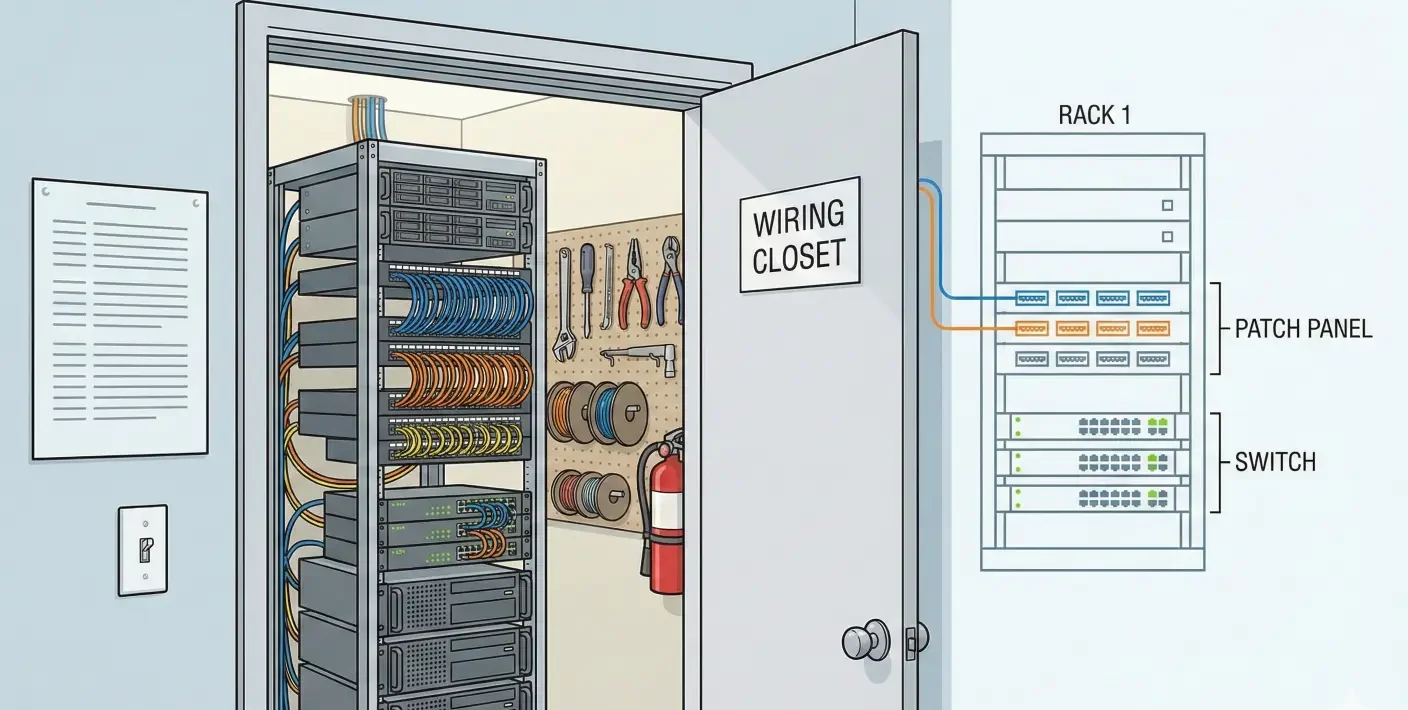
The wiring closet is the “mechanical room” of a modern home—except it often gets treated like an afterthought. If you pick the wrong location, you can end up with heat issues, messy terminations, and a closet that nobody can service without tearing things apart.
Wiring closet basics are very important!
If you’re the architect coordinating systems on a custom home, you’re usually not trying to design the rack down to the last port. You’re trying to make sure there’s a sane, buildable place for it to live: a home network rack wiring closet that stays cool, organized, and serviceable for the life of the home.
This guide focuses on the planning decisions that matter early: where the tech closet goes, how it “breathes,” how it’s terminated (rack vs structured wiring panel), and how it’s labeled and documented so upgrades don’t turn into drywall cuts and blame-shifting between trades.
The tech closet is now a core utility room (treat it like one)
In a typical custom home today, the “tech closet” (or wiring closet) is where multiple systems converge:
- The home network backbone (router, switches, sometimes ISP equipment)
- Wired Wi-Fi infrastructure (often multiple access point runs)
- Security and surveillance terminations
- Distributed audio/video connectivity and control wiring
- Automation and lighting control infrastructure
- Sometimes service equipment for outdoor entertainment, gates, or accessory structures
Even if the homeowner’s vision is “a clean, simple smart home,” the underlying infrastructure still needs a stable hub.
The reason afterthought closets fail isn’t mysterious—it’s predictable:
- No space reserved for service access, so the closet turns into a cable “pile” that can’t be touched safely.
- No plan for pathways, so the low-voltage team improvises routing and the result is messy or impossible to expand.
- No consideration for heat and airflow, so equipment runs warm in a sealed closet.
- No labeling and documentation standard, so future service is guesswork.
Architects can prevent most of that with one shift: treat the tech closet like a utility room that deserves intentional placement, clearances, and a coordination checklist.
Quick placement checklist: where your network rack should live
If you only have time to do one thing, do this: use a placement checklist before the floor plan hardens. A “good” network rack location isn’t just central—it’s serviceable, stable, and buildable.
1) Put it where it can be serviced without drama
Ask: Can someone stand in front of the rack/panel and work without removing shelves, vacating a closet, or contorting around door swings?
Common misses:
- Rack placed behind hanging clothes
- No wall space for mounting a structured wiring panel cleanly
- Door swing blocks access to the equipment zone
- No clearance to open rack doors or swing out equipment (if applicable)
The end goal is simple: the closet should function even when the homeowner uses it as a closet. If service requires emptying it, it won’t get serviced.
2) Favor stable, conditioned space when possible
Many homeowners discover the hard way that network and AV equipment behaves more consistently when it lives in stable indoor conditions. Unconditioned spaces and extreme temperature swings can create reliability headaches.
This doesn’t mean the tech closet must be in the middle of the home—but it does mean you should be cautious about spaces that run hot, cold, damp, dusty, or unpredictable. If a location choice forces you into a high-variance environment, plan for mitigation early (not as a field “fix”).
3) Consider noise and the lived experience
Not all equipment is loud, but some setups produce audible fan noise—especially as the system grows.
Architect-friendly question: Is the closet adjacent to a bedroom, study, media room, or other quiet zone where fan noise would become a recurring complaint?
If the answer is yes, that doesn’t automatically eliminate the location—but it may affect:
- Wall assembly choices
- Door type
- Whether active ventilation becomes necessary (TBD based on equipment plan)
- Whether a different placement is smarter in this specific home
4) Avoid moisture and heat risk zones
This is less about perfect rules and more about common sense coordination:
- Avoid areas with higher moisture exposure or water risk.
- Avoid stacking low-voltage infrastructure into a space already burdened by other heat-producing systems unless the design can support it.
A tech closet doesn’t need to be precious. It does need to be predictable.
The best (and worst) closet locations—real-world tradeoffs
Architects don’t get to choose from infinite perfect options. You’re balancing centrality, aesthetics, pathways, and buildable space. Here’s how the common locations tend to play out.
Interior closet near a central corridor
This is often a strong option because it supports clean cable pathways across the home and tends to live in stable indoor conditions.
Watch-outs:
- It’s easy to under-size this closet because it “looks like a closet.”
- If it becomes a household storage closet, service access can be compromised.
- You’ll want to coordinate door swing, shelving, and the dedicated equipment wall early.
Architectural tip: If you choose this location, protect a dedicated wall zone (or a dedicated section) that stays equipment-first, not storage-first.
Dedicated low-voltage closet near mechanical room (when it works)
A dedicated low-voltage closet can be great—especially when it’s designed from the start as a utility space with clearances, pathway planning, and ventilation strategy.
When it works:
- There’s a defined equipment area (rack/panel zone) and a defined pathway plan.
- The space is not an afterthought squeezed into leftover square footage.
- The closet is accessible without moving other equipment.
When it doesn’t:
- It becomes a crowded “everything room” where multiple trades compete for the same wall space and pathways.
- Heat and airflow were not planned, and the room becomes a warm box.
Garage, attic, or laundry adjacency (common pitfalls)
These locations are common because they’re convenient to “hide” technology, but they often introduce avoidable risks.
Typical pitfalls:
- Environmental variability and dust (especially in garages/attics)
- Difficulty maintaining clean service access
- Pathway challenges to reach key interior areas without awkward routing
- Closet use conflicts (laundry storage becomes equipment interference)
- Higher likelihood of “we’ll figure it out later” field decisions
If a project must use one of these locations, the key is not denial—it’s early mitigation planning. Don’t pretend it will behave like an interior utility room.
Central isn’t always best—serviceability is
Here’s the misconception that causes the most pain: “The tech closet should be in the most central closet possible.”
Centrality helps pathways, but it doesn’t automatically create a serviceable system. A slightly less central location that is accessible, stable, and buildable will often outperform a central closet that becomes cramped, hot, and impossible to work in.
If you’re choosing between “perfectly central but compromised” and “slightly off-center but serviceable,” serviceability wins—especially in custom homes where upgrades and changes are part of ownership.
Rack vs structured wiring panel: choose the right ‘container’ early
Architects don’t need to dictate equipment brands, but you do need to plan the container type early—because it changes space requirements, wall planning, and trade coordination.
When a structured wiring panel is enough
A structured wiring panel can be appropriate when the home’s infrastructure is relatively modest and the goal is clean terminations rather than housing a lot of active equipment.
A panel may make sense when:
- You primarily need a clean termination point for low-voltage runs
- The amount of active gear is limited or can live elsewhere (TBD based on system design)
- The project isn’t aiming for significant distributed AV/network expansion
The advantage is that panels can be clean and compact. The risk is that they’re easy to outgrow when device counts increase.
When you need a rack (or rack + panel)
A rack becomes more compelling when you expect a meaningful amount of active equipment and future growth.
Racks are often chosen when:
- Multiple switches, controllers, or distribution components need organized mounting
- Service access and cable management matter long-term
- The system is expected to grow (ports, zones, outdoor areas, accessory structures)
A common practical approach is a hybrid: a clean termination strategy plus rack space for active gear—so the closet stays organized and serviceable.
Future growth: ports, switches, power, ISP changes
Even if the current scope feels “standard,” custom homes evolve:
- Home office needs change
- Camera coverage expands
- Outdoor entertainment grows
- Internet service hardware changes
- Wi-Fi infrastructure upgrades
This is why early container selection matters. You’re not only designing for today’s port count—you’re designing for a home that changes without chaos.
Ventilation basics: keeping equipment reliable without overbuilding
Heat issues in wiring closets are rarely caused by one catastrophic mistake. They’re caused by a predictable combination: multiple active devices in a sealed space with no airflow plan.
Heat sources: switches, routers, amps, DVR/NVR
Different homes have different loads, but the pattern is consistent: active networking and AV gear generates heat over time.
This is why ventilation needs to be planned as a concept, even if the specific ventilation solution is TBD until the equipment plan is confirmed.
Airflow concept (in/out, not “sealed closet”)
The simplest mental model for a tech closet is: it needs a way to avoid becoming a sealed warm box.
In practice, “ventilation” can mean different things depending on scope:
- Passive airflow strategy
- Air exchange via architectural choices
- Mechanical assistance in more demanding scenarios (TBD)
What matters early is that the closet isn’t designed as an airtight storage volume with zero consideration for heat management.
What to coordinate: louvered doors vs vent grilles vs mechanical assistance (TBD specifics)
Architects often get asked, “Should it be a louvered door?” The honest answer is: it depends on the equipment load and where the closet sits in the home.
What you can coordinate early:
- Ensure there’s a pathway for air movement if the load requires it
- Avoid designing the closet as a sealed cabinet within a sealed closet
- Confirm where heat will go (into the house, out of the house, or managed mechanically)
If you don’t yet know the load, phrase this as a design allowance and coordination item:
- “Ventilation strategy to be confirmed based on final equipment load.”
Common failure mode: stacked gear, no airflow, closed door
The most common “hot closet” scenario looks like this:
- Active devices stacked tightly
- Cables packed in front of ventilation paths
- Closet door closed
- No plan for air movement
The result is not always immediate failure. It’s often slow unreliability: intermittent issues, performance complaints, and service calls that shouldn’t be necessary.
Patch panels and terminations: how to keep it clean and serviceable
The difference between a closet that looks professional and one that becomes a nightmare is often the termination strategy.
Why patch panels matter (organization + troubleshooting)
Patch panels create a clear, organized interface between the home’s fixed wiring and the active equipment.
The benefit is practical:
- Moves, adds, and changes happen without disturbing fixed cabling
- Troubleshooting becomes faster because there’s a known map of what goes where
- The closet stays cleaner as systems expand
Even if the homeowner never sees it, the serviceability dividend is real.
Service loops, bend radius, strain relief (TBD specs)
This is where it’s easy to overstep into technical specifications. The architect-friendly takeaway is simply:
- Terminations need to be done in a way that respects cable handling and long-term maintenance.
If you’re documenting expectations, keep it general unless the integrator provides confirmed standards:
- “Provide serviceable terminations with appropriate slack and clean cable management.”
Clean separation: data vs coax vs control wiring
Closets become confusing when everything is bundled together indiscriminately. Even a visually tidy closet can be hard to service if categories are mixed.
A simple organization posture helps:
- Data terminations in a clear area
- Coax terminations in a clear area
- Control wiring clearly labeled and grouped
This is less about a perfect diagram and more about preventing future “what is this cable?” moments.
Access and labeling: the difference between ‘works today’ and ‘works for 10 years’
A home can have top-tier equipment and still feel like a mess if the infrastructure isn’t labeled and documented in a way that survives time.
Labeling approach that survives remodels (room naming consistency)
Labeling fails when it doesn’t match the language people use.
If the plan set calls a space “Study” and the homeowner calls it “Office,” and the low-voltage labels say “Room 3,” nobody wins.
A durable approach:
- Use consistent room names aligned to the final plans
- Label both ends of each run
- Keep labels readable and standardized
You don’t need to define the exact labeling standard in the article if it’s not confirmed—just insist on the principle: consistency and clarity.
Documentation handoff (as-builts, port maps, photos)
Architects know the value of as-builts. The tech closet is no different.
A practical handoff package often includes:
- A basic port map (what goes where)
- Photos of the closet post-termination
- A simplified layout diagram (even if informal)
- Notes on any intentional allowances for future growth
This doesn’t need to be elaborate. It needs to exist.
Guest-proofing for service: clear layout and “what is what”
When service is needed, the person on site may not be the original installer. The closet should be legible to someone who didn’t build it.
That means:
- Equipment laid out logically
- Cabling organized
- Labels visible
- No hidden “mystery bundles”
- A clear path to access the equipment without moving household items
Serviceability is a design outcome. It doesn’t happen by accident.
Proof posture: what a “good” closet looks like before drywall closes
Architects are often the last line of defense before a poor wiring closet becomes permanent. A few checks before drywall and cabinetry can prevent years of pain.
Pre-wire walk checklist
Use a walk checklist that focuses on coordination and serviceability:
- Is the reserved space still intact (not encroached by framing changes)?
- Are pathways clear and logical (not improvised)?
- Is there a defined equipment zone that won’t be blocked by shelving?
- Is there an intent for ventilation (even if final method is TBD)?
- Are low-voltage runs grouped cleanly and routed intentionally?
Photos to capture (paths, labels, terminations)
Photos are a simple, high-value move:
- Take photos of cable paths before they’re concealed
- Capture the closet area before cabinetry and shelving closes it in
- Photograph labeling at both ends where feasible
These become the “as-built memory” when someone is trying to add an access point, camera, or speaker run later.
Questions architects should ask the integrator
Even if you’re not specifying the details, you can ask the questions that force clarity:
- “What container are you planning—rack, panel, or hybrid?”
- “How will service access work once shelving and doors are installed?”
- “What’s the plan for heat and airflow based on the expected equipment load?”
- “What’s your labeling and documentation handoff?”
- “What future growth are we allowing for?”
These questions help align trades early and reduce last-minute field improvisation.
Next steps: a coordination workflow architects can reuse
A good wiring closet doesn’t happen in one meeting. It happens through consistent checkpoints aligned to the design and build phases.
Early design: reserve space + pathways
In early design, your job is to protect:
- The closet location
- The dedicated equipment wall/zone
- Pathways for low-voltage runs
This is where you avoid the “we’ll find a closet later” trap. The earlier you reserve space, the fewer compromises you’re forced into later.
Mid design: confirm rack size and power plan (TBD)
Once the scope is clearer, confirm:
- Whether the plan calls for a rack, panel, or hybrid
- Rough space needs for service access and cable management
- Power strategy (TBD specifics based on integrator/electrical coordination)
If specifics aren’t confirmed, document the need as a coordination item rather than guessing.
Pre-drywall: verify terminations + labeling plan
Before drywall closes:
- Confirm termination strategy is aligned to the chosen container
- Confirm labeling is happening in a consistent way
- Confirm the closet won’t be compromised by shelving or millwork
This is the last easy moment to adjust.
Post-install: client handoff package
The homeowner’s experience of the system is influenced by how maintainable it is. A clean handoff matters:
- Basic documentation
- Photos
- Port map
- Notes for future upgrades
When this is done well, the home stays upgrade-ready instead of becoming brittle.
Coordinate the tech closet early (so the home stays upgrade-ready)
Need to choose a location for the tech closet before the plan set locks? AVI Group helps architects coordinate space, pathways, ventilation planning, and service access so the infrastructure stays clean and upgrade-ready.
Share your floor plan and even rough device assumptions. We’ll help you define a practical tech closet layout and coordination checklist your trades can build from.
FAQ content
1) Where should you put a network rack in a house?
A good location is one that’s serviceable, stable, and buildable—not just “central.” Favor a space with clear service access, room for clean terminations, and a pathway plan that can reach key areas without awkward routing. If you’re choosing between a cramped central closet and a slightly less central space that’s truly serviceable, serviceability usually wins.
2) Do wiring closets need ventilation, and what’s the simplest approach?
Wiring closets can become unreliable when active equipment runs warm in a sealed space. The simplest approach is to avoid designing the closet as an airtight box and plan for an airflow strategy appropriate to the expected equipment load. The specific method (passive vs more involved) is best confirmed once the equipment scope is known.
3) What’s the difference between a structured wiring panel and a rack?
A structured wiring panel is often used for compact terminations and smaller-scale infrastructure. A rack is typically used when more active equipment, organization, and serviceability are needed—especially as systems grow. Some homes use a hybrid approach to keep terminations clean while providing space for active gear.
4) What’s the best closet for a router and switches in a custom home?
The best closet is one that stays accessible and predictable over time—meaning it isn’t blocked by storage, has a stable indoor environment when possible, and supports clean cable management. Noise, heat, and pathway planning should be considered early so the closet remains functional and easy to service.
5) How should low-voltage cables be labeled in a new build?
Labels should be consistent, readable, and aligned with the final room naming on the plans. Ideally, both ends of each run are labeled so future service doesn’t become guesswork. A simple port map and photos of terminations can dramatically improve long-term maintainability.
6) What should architects coordinate before drywall for the tech closet?
Confirm the closet location and dedicated equipment zone, the container type (panel, rack, or hybrid), pathway routing, and a clear labeling/documentation plan. Also verify that shelving, millwork, and door swing won’t compromise service access after installation.
Need to choose a location for the tech closet before the plan set locks? AVI Group helps architects coordinate space, pathways, ventilation planning, and service access so the infrastructure stays clean and upgrade-ready. Share your floor plan and rough device assumptions—we’ll give you a practical closet layout and coordination checklist your trades can build from.
RELATED LINK: