
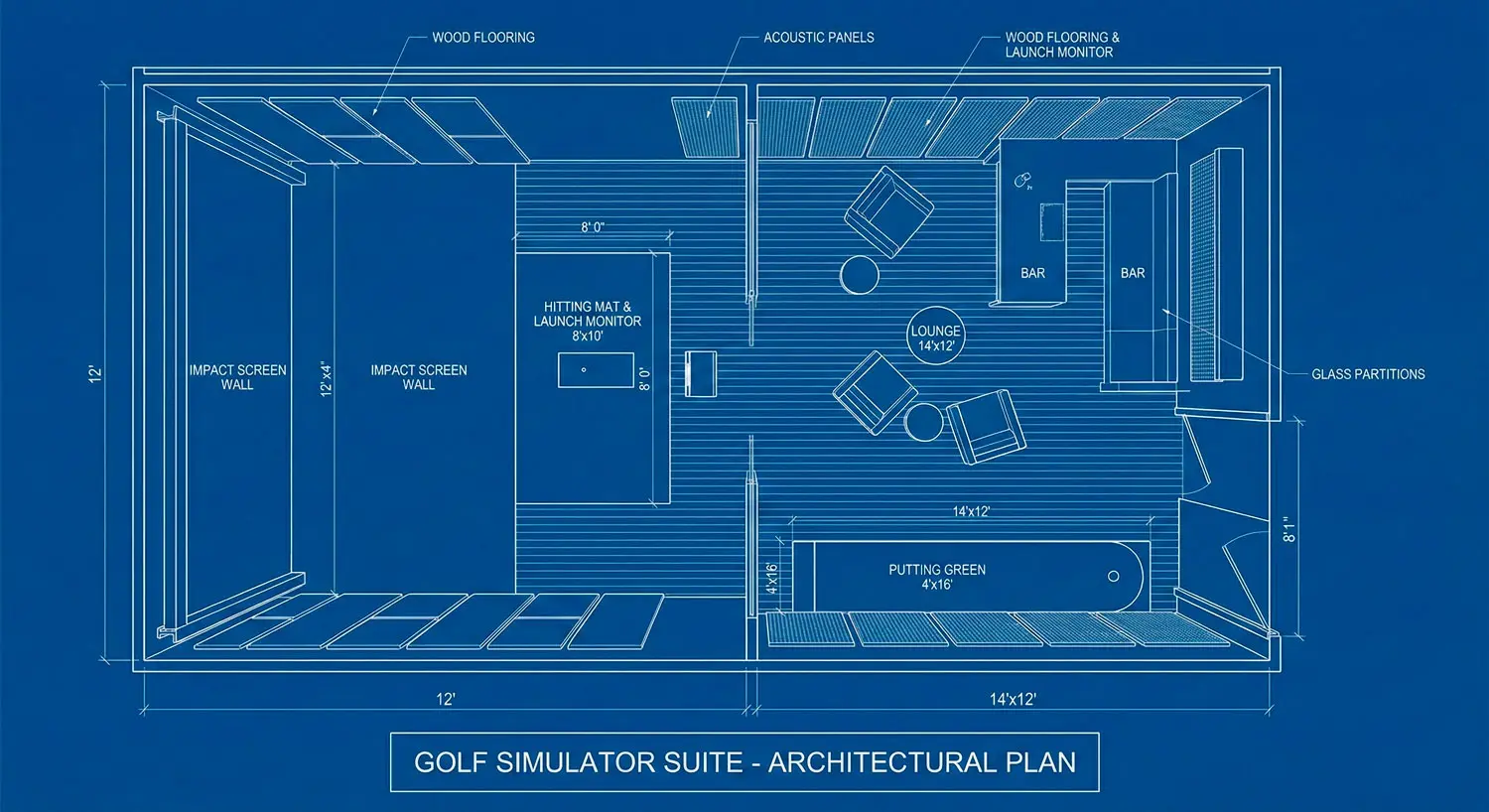
The Importance of Golf Simulator Room Dimensions
The room you want to use is the room you already have—until a ceiling beam, a too-close screen, or bad lighting turns your “simulator build” into a compromise you can’t unsee. Most simulator disappointments aren’t about the launch monitor brand; they’re about room geometry and placement decisions made too early.
If you’re converting a spare room with limited ceiling height, the goal isn’t to find one magic number that proves it will work. The goal is to confirm a layout that feels safe and believable—where you can swing comfortably, the image looks right from the hitting position, and the screen/enclosure setup matches how it’s meant to be installed.
This guide starts with a practical feasibility checklist you can run before you order anything, then walks through the layout mistakes that create misreads, glare, bounceback risk, and that subtle “this doesn’t feel real” vibe you can’t shake once you notice it.
The real problem: it’s not the simulator—it’s the room geometry
A simulator can “fit” in a room and still feel wrong. That happens because a simulator isn’t a single object—it’s a relationship between:
- where you stand (the hitting position)
- where the ball travels (the impact zone)
- where the image lives (screen size and viewing angle)
- where the tech sees you (launch monitor positioning)
- what the room does to light and sound (fixtures, windows, reflections)
When any one of those is forced into a bad compromise, you feel it immediately. The swing feels constrained. The screen looks too close or oddly scaled. The picture washes out. You start adjusting your stance to “make it work,” and suddenly the simulator is controlling you instead of the other way around.
A simulator space feels real when a few simple things are true:
- You can swing without flinching about the ceiling, walls, or fixtures.
- The hitting position feels natural—like a normal address position, not a workaround.
- The screen distance and image scale feel believable from where you stand.
- Lighting supports the image (and doesn’t create glare or shadows where it matters).
- Safety is baked into the layout, not handled with “we’ll be careful.”
If your room has limited ceiling height, you can still get there—but you have to validate geometry first, then buy equipment that matches the plan.
Feasibility checklist (do this before you buy anything)
This checklist is designed for the most common real-world scenario: a spare room that might work, but only if you plan around constraints. Don’t rush through it. A careful hour here can save a week of rework later.
Ceiling height: measure the room and the swing envelope
Most people measure floor-to-ceiling once and stop. That’s not enough—especially in a room with limited height.
What to check instead:
- Measure multiple points, not one. Low spots matter: soffits, beams, sloped ceilings, ceiling fans, recessed cans, and light fixtures.
- Stand where you think you’ll hit and look up. The hitting position is rarely centered in the room, so ceiling clearance where you stand matters more than clearance near the screen.
- Account for the swing path, not just your height. The highest point of a swing isn’t your head—it’s the club arc, and it changes by golfer, club, and swing style.
A practical way to validate without guessing:
- Identify your likely hitting position.
- Use a club you expect to swing (many people test with a driver, but any club that creates a high arc for you is relevant).
- Do a slow, controlled practice swing (no ball) with awareness of the ceiling and fixtures.
- If you feel the instinct to “hold back” or change your swing, treat that as a red flag. A simulator that makes you protect the ceiling will never feel relaxed.
If multiple people will use the space, validate for the tallest likely golfer and the widest range of swings you expect.
Room width/depth: confirm stance comfort + safe screen distance
Room size isn’t just “is there enough space?” It’s “is there space in the right places?”
Start with two anchors:
- Where the screen will go (one wall)
- Where the hitting position can realistically live (far enough back to be safe and comfortable)
Then check:
- Width at the hitting position
You need room for a natural stance and a full follow-through without feeling like you’re threading a needle. This is where spare bedrooms often fail—not because they’re tiny, but because doorways, closets, or furniture zones pinch the swing area. - Depth from hitting position to screen
Depth affects safety and feel. Too close and you may feel crowded and risk higher bounceback issues. Too far and you can end up with a screen that feels small, projection challenges, or an awkward room layout that wastes usable space.
Instead of chasing a single “ideal” dimension, aim for a plan where:
- the hitting position is comfortable
- the screen feels proportional from where you stand
- the screen/enclosure can be installed according to its intended clearances (this is where manufacturer specs matter most)
Obstructions: beams, soffits, lights, garage tracks, HVAC
In low-ceiling rooms, obstructions are usually the true decision-makers.
Common deal-breakers:
- Ceiling fans (especially right over where you’d naturally stand)
- Hanging fixtures (pendants, chandeliers)
- Soffits hiding ductwork that run across the “perfect” hitting line
- Basement beams that cut across the swing zone
- Garage door tracks and openers if you’re planning a garage bay simulator
- HVAC registers that blow directly into the hitting area (comfort and dust concerns)
Don’t just note that an obstruction exists—note whether it forces the hitting position into a weird spot. A room can have a low beam and still work if the hitting position naturally falls away from it. The same beam becomes a problem if it sits exactly where your swing wants to live.
Power/data + mounting: where the tech actually needs to live
Even if you’re not doing a fully integrated “smart” build, simulator rooms have real infrastructure needs. Planning them after the fact creates exposed cords, awkward mounts, and compromised placement.
Before you buy equipment, identify:
- Where the projector will mount (ceiling, drop mount, or alternative placement)
- Where power must be available near projector/screen/tech station
- Where the control device will live (computer/tablet, audio, network)
- Whether you need a wired network for stability (often preferred in high-performance AV contexts)
- How you’ll route cables cleanly (in-wall, raceways, or concealed paths)
If you’re coordinating with a contractor, this is the moment to align on outlets, conduit options, and mounting reinforcement—especially in older homes where ceilings and walls can be unpredictable.
Lighting control: glare, shadows, and “washed-out” projection
Lighting is the quickest way to make a good simulator feel cheap.
What to check:
- Windows and daylight: Can you control daylight with shades or curtains? If the room has large windows, you need a plan.
- Fixture placement: Lights directly over the hitting position can create harsh shadows. Lights aimed toward the screen can wash out the image.
- Reflective surfaces: Glossy paint, mirrors, framed glass, and shiny flooring can throw glare back toward the screen.
The simplest pre-buy test:
- At the time of day you’ll actually use the simulator, stand where you’ll hit and look at the screen wall.
- If the wall is bright, reflective, or backlit, plan for lighting control early.
This is also where smart lighting scenes can be a difference-maker—one tap to shift from “normal room” to “simulator mode” without rethinking the whole room every time.
Safety check: bounceback risk factors you can spot early
Bounceback risk is influenced by screen/enclosure setup details that should be validated against manufacturer guidance. Without getting overly technical, you can still spot risk factors early:
- Very tight depth that forces you close to the screen
- Hard surfaces near the impact zone (exposed walls, hard trim, furniture)
- No plan for side/ceiling protection near the screen
- A screen/enclosure plan that’s improvised instead of based on intended installation guidance
The safest posture here is simple: design around the intended clearances and installation method for the screen/enclosure you plan to use, and avoid “we’ll figure it out” setups that put you too close to the impact zone.
The contrarian moment: “minimum ceiling height” is the wrong first question
It’s tempting to start with, “What is the minimum ceiling height for a golf simulator room?” because it feels like a yes/no answer. But in a constrained spare room, that question often leads you into false confidence—or unnecessary panic.
A better first question is:
“Where can the hitting position go safely with the tallest likely swing in this room?”
Why that’s better:
- Ceiling height isn’t uniform in many rooms (beams, fans, sloped ceilings).
- Swing arcs vary dramatically between golfers—even at the same height.
- The hitting position is the hinge point. If you can’t place it where a normal stance and swing feel natural, everything else becomes a compromise.
Driver swings and tall golfers magnify the issue, but they’re not the only factor. Sometimes it’s a ceiling fan at the wrong spot, or a light fixture you didn’t think about, that forces a layout that feels cramped.
And here’s the part people don’t love hearing:
If your room only works with a “shorter club plan” (for example, permanently limiting what clubs can be swung), that’s not automatically wrong—but it’s a conscious compromise. It should be decided upfront, not discovered after you’ve installed the screen and realized you can’t swing freely.
If you’re building a simulator as an entertainment centerpiece, repeated compromise tends to erode enjoyment. If you’re building it as a practice tool with known constraints, you may accept those tradeoffs—if you define them early.
Common layout mistakes that ruin realism (and how to avoid each)
You can have great equipment and still end up with a space that feels off. These are the most common mistakes in spare-room builds—and what to do instead.
Screen too close / too far
When the screen is too close, the space feels crowded and risk tolerance drops. People start hitting “carefully,” which defeats the purpose. You can also end up with a screen that’s hard to view comfortably from the hitting position.
When the screen is too far, the opposite happens: the image can feel small or detached, and projector placement becomes harder. The room can also feel like wasted depth, where your hitting position is too far from the action.
How to avoid it:
- Start with the hitting position and a comfortable viewing angle.
- Choose a screen size and placement that feels proportional from where you stand.
- Validate the screen/enclosure clearances using manufacturer guidance, not guesswork.
Hitting position centered wrong
A classic DIY mistake is placing the hitting position wherever it “looks centered” in the room. But the room isn’t the reference point—your swing and follow-through are.
Centered wrong can cause:
- cramped follow-through toward a wall
- awkward stance due to furniture or doorways
- limited handedness flexibility (right vs left) if multiple users will hit
How to avoid it:
- Tape out the swing zone on the floor and test stance comfort.
- Prioritize clearance where the club travels, not where the tape looks symmetrical.
- If both right- and left-handed play is a goal, plan for it early. If it isn’t feasible, be honest about it and design for one dominant orientation.
Projector placed as an afterthought
Projector placement is often the hidden constraint—especially in low-ceiling rooms. If you decide screen size first and “figure out projector later,” you can end up with:
- shadows from the golfer or club
- awkward keystone distortion
- a mount location that conflicts with lights, fans, or beams
- a projector that’s hard to access for maintenance
How to avoid it:
- Treat projector placement as part of the layout, not an add-on.
- Use the projector’s throw specifications (or calculator) to confirm it can produce the image size you want from a realistic mounting point.
- If ceiling mounting is difficult due to height or obstructions, explore alternatives early rather than forcing a bad mount.
“Any mat works” assumption
Mats seem simple until you’ve used a bad one. A mat that slides, sits on uneven flooring, or feels harsh underfoot changes the entire experience—especially when you’re practicing often.
Problems this creates:
- inconsistent stance feel and alignment
- discomfort that shortens sessions
- ball behavior that feels “off”
- frustration that gets blamed on the simulator tech
How to avoid it:
- Ensure the floor under the mat is stable and level.
- Plan the hitting area so it doesn’t feel like a temporary add-on to the room.
- Confirm mat/floor compatibility as part of the build plan, not a last-minute purchase.
Ignoring side/ceiling protection
People focus on the screen and forget what happens around it. In a real room, mishits happen—especially with guests, kids, or first-time players.
Ignoring protection can lead to:
- wall damage
- broken lights or trim
- a constant feeling of “don’t miss”
- loss of confidence, which makes play less fun
How to avoid it:
- Identify the “risk zone” around the impact area.
- Plan side and ceiling protection where it’s most likely to be needed, not everywhere.
- Design the space so it feels safe by default—especially if it’s a family entertainment room.
Bounceback and safety: the setup choices that matter most
Bounceback risk is one of those topics where the right answer depends on the specific screen/enclosure system and how it’s installed. That’s why it belongs in “verify with specs” territory rather than internet certainty.
At a high level, bounceback tends to become more likely when:
- the hitting position is forced too close to the screen
- the screen/enclosure isn’t installed with the intended clearances and tensioning
- there are hard surfaces too close to the impact zone
- the space encourages “flat” impact into a tight area without safety margin
The most practical “safer by design” moves for a spare-room build are:
- Don’t crowd the screen. If your room depth forces you uncomfortably close, treat that as a sign to reconsider the room or reorient the layout.
- Follow the installation guidance for your screen/enclosure. This includes clearance, mounting, and tensioning details. Guessing here creates risk.
- Build a protection zone around the impact area. Side and ceiling protection should be planned based on where mishits are likely—not just where it looks clean.
- Create usage rules that match the room. If the room is tight, decide upfront how it will be used (who plays, what clubs, what conditions) rather than discovering limits after something goes wrong.
If you’re unsure how to balance realism and safety in a constrained room, this is one of the strongest reasons to get a layout check before you buy equipment.
Flooring and lighting: the two upgrades that quietly change the experience
If you’ve ever seen a simulator that looks impressive but feels underwhelming, odds are flooring and lighting were treated like afterthoughts.
Flooring considerations (stability, comfort, noise, ball roll)
Flooring affects more than comfort. It affects confidence, acoustics, and how “finished” the room feels.
What to prioritize:
- Stability under the mat: A mat that shifts or sits unevenly becomes a constant annoyance.
- Comfort for longer sessions: If you plan to practice often, the room should support time-on-feet without fatigue.
- Noise control: Impact sounds reflect off hard surfaces. Flooring choices can help the room feel less harsh.
- Ball behavior in the room: If you care about chipping/putting or ball roll on the floor, plan for how the surface behaves.
The goal isn’t a single “best” flooring type. The goal is a stable, comfortable base that supports your mat and feels consistent.
Lighting control considerations (fixtures, dimming, directionality)
Lighting is about control. You want:
- enough light to move safely and comfortably
- controlled light near the screen to preserve image quality
- minimized glare and distracting reflections
Practical ways to think about it:
- Lights that point toward the screen often cause washout.
- Lights directly above the hitting position can create harsh shadows.
- Dimming and zoning make a huge difference, especially in multi-use rooms.
If your simulator room is also a family room, office, or guest space, lighting control becomes even more valuable—you’re not building a cave, you’re building a room that can switch modes.
The “looks premium on day one” test: glare/shadow walkthrough
Before you finalize anything, do a simple walkthrough:
- Stand in the hitting position and look at the screen wall.
- Imagine the projector image and ask: where would glare come from?
- Move through the room at night with the lights on and check for reflections and harsh spots.
- Think about how quickly you can switch from “normal room” to “simulator mode.”
If the room requires a complicated ritual just to look good, it will eventually become friction you resent.
How to verify your plan (proof posture)
You don’t need perfect certainty before you start—but you do need verification steps that remove the biggest unknowns.
Compare your room plan against manufacturer specs (screen/enclosure/monitor/projector)
This is where many projects go from “idea” to “real plan.”
Collect the installation requirements for:
- the screen/enclosure system you’re considering
- the projector (throw distance, mounting constraints)
- the launch monitor (placement requirements and environmental considerations)
Then compare your taped plan to those requirements. If something doesn’t fit, it’s better to find out now than after you’ve mounted hardware.
Do a tape-out mock layout on the floor (screen line, hitting line, swing zone)
Tape-out is simple and powerful. Mark:
- the screen plane (where the screen face would be)
- the hitting line (where the ball position would be)
- the swing zone (a practical “no-conflict” area around the golfer)
Then stand there. Swing slowly. Walk around it. Imagine a second person watching. The tape-out reveals awkwardness that measurements hide.
Photo/video check from golfer POV (shadows, alignment, comfort)
Take a quick video from behind the hitting position looking toward the screen wall. Also take one from the side.
You’re looking for:
- whether the room feels cramped at the hitting position
- whether lighting creates obvious glare
- whether obstructions are in your line of sight or swing path
- whether the layout “reads” like a believable simulator room
This is also useful if you plan to consult with a professional—you can show the room and layout clearly.
What to bring to a consultation to get a fast, accurate answer
If you want a quick, confident layout assessment, bring:
- room dimensions (including height at multiple points)
- photos of the ceiling and any obstructions
- where you want the screen to go (and why)
- how the room will be used (practice vs entertainment, solo vs multiple users)
- any must-haves (right/left-handed play, seating, dual-use room needs)
The clearer your constraints, the faster you can get a plan that fits the room you actually have.
Three paths depending on your room constraints
Once you’ve done the checklist and tape-out, you’ll usually land in one of three realities.
Path A: Room works as-is (proceed with a clean plan)
You have a comfortable hitting position, manageable obstructions, and a layout that supports screen size, projector placement, and lighting control.
Next steps:
- finalize screen size and placement
- confirm projector placement using throw specs
- plan power/data and mounting points
- choose flooring/mat solutions that feel stable and finished
This is the best-case scenario: you can build confidently without forcing compromises.
Path B: Room works with constraints (define the compromises upfront)
The room can work, but only if you accept specific limitations—often related to ceiling height, hitting position placement, or dual-use requirements.
Next steps:
- write down the constraints as decisions (not “we’ll see”)
- design around them intentionally (especially lighting and safety)
- choose equipment that matches the plan, not aspirational wish lists
This path can still produce an excellent simulator experience if you’re honest early and don’t buy gear that assumes a different room.
Path C: Room doesn’t work (alternate rooms / reorientation / partial remodel)
Sometimes the tape-out reveals the truth: the hitting position can’t be placed safely or comfortably, or obstructions force too many compromises.
Next steps:
- test an alternate room orientation (screen on a different wall)
- consider another room that you initially dismissed
- evaluate targeted changes (removing a fan, changing lighting, rethinking storage) if the room is close
- if it’s a garage plan, explore track/opener options and ceiling clearance implications with a pro
Calling this early is a win. The only “bad” outcome is spending money and discovering the room doesn’t work after installation begins.
Get a pro layout check before you order equipment
Converting a spare room with a low ceiling? Don’t buy equipment first and hope it works. AVI Group can review your room dimensions, obstructions, and intended screen size to confirm a safe, realistic layout. You’ll get a clear placement plan—and a straight answer on what compromises (if any) make sense. Book your free consultation to validate the room before you order.
Frequently asked questions
What is the minimum ceiling height for a golf simulator room?
There isn’t one universal minimum that applies to every room and every golfer. Ceiling clearance depends on where the hitting position falls in the room, the presence of obstructions (fans, beams, soffits), and the tallest likely swing arc—especially with longer clubs. A practical approach is to tape out the hitting position and do slow practice swings to confirm you can swing naturally without altering your motion, then verify any final plan against the requirements of your chosen equipment and setup.
How wide does a golf simulator room need to be for a comfortable swing?
The room needs to be wide enough at the hitting position to allow a natural stance and follow-through without feeling like you’re avoiding walls, doors, or furniture. Width requirements vary based on the golfer and whether the room needs to support both right- and left-handed play. The most reliable test is to tape out the intended hitting area, take a comfortable stance, and do controlled practice swings to confirm you’re not subconsciously “protecting” the room.
How deep should a golf simulator room be for safe screen distance and projection?
Depth needs to accommodate a safe, comfortable distance between the hitting position and the screen, plus whatever space the screen/enclosure system requires to be installed correctly. It also needs to support projector placement for the image size you want. Because enclosure and projector requirements vary, it’s best to start with a taped layout (screen line + hitting line), then confirm the plan using the installation guidance for the screen/enclosure and the throw specifications for the projector you’re considering.
What are the most common golf simulator setup mistakes in spare bedrooms?
The most common mistakes are measuring the room once and assuming it will work, placing the hitting position where it “looks centered” rather than where a swing is comfortable, treating projector placement as an afterthought, ignoring lighting control (glare and washout), and skipping side/ceiling protection near the impact area. These mistakes often lead to expensive rework because they’re discovered after equipment is purchased or mounted.
What’s the best flooring for a golf simulator room?
The best flooring is the one that keeps the hitting mat stable, supports comfort during longer sessions, and helps the room feel finished rather than temporary. Noise control and how the surface behaves around the hitting area can also matter, especially in multi-use rooms. Because mat systems and room conditions vary, it’s smart to confirm flooring compatibility with the mat/setup you plan to use and prioritize a level, stable base.
How can I reduce bounceback risk on an impact screen?
Start by avoiding layouts that force you too close to the screen, and design the space so the screen/enclosure can be installed exactly as intended by the manufacturer (including clearance and mounting/tensioning guidance). Plan side and ceiling protection around the impact area where mishits are most likely, and keep hard surfaces out of the immediate risk zone. If your room is tight or you’re unsure about the safety tradeoffs, a professional layout review can help you choose a setup that balances realism and safety.
Book Your Free Consultation (spare-room feasibility + layout plan)
Converting a spare room with a low ceiling? Don’t buy equipment first and hope it works. AVI Group can review your room dimensions, obstructions, and intended screen size to confirm a safe, realistic layout. You’ll get a clear placement plan—and a straight answer on what compromises (if any) make sense. Book your free consultation to validate the room before you order.