
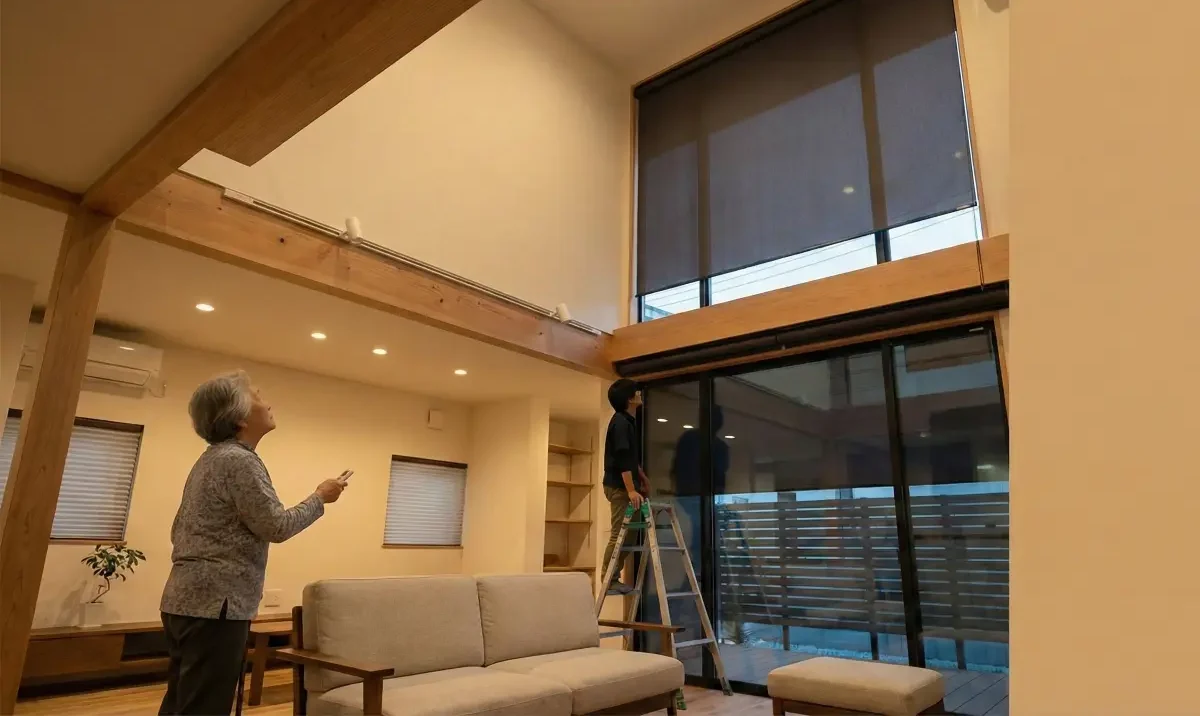
If you’re juggling a house full of tall windows, skylights, or “two-story glass,” shades stop being décor and start being a daily operations problem. Motorized shades can feel like the obvious upgrade—until you’re stuck choosing between wiring, batteries, remotes, apps, and the fear that something will fail in the hardest-to-service spot.
So are motorized shades worth it?
This guide is a practical decision filter: where motorization pays off, where manual is smarter, and how to plan it so it doesn’t become an expensive annoyance—especially when your main pain is simply getting control over hard-to-reach windows in a way your household will actually use.
The real question isn’t “smart” — it’s “will you use it daily?”
Motorized shades are rarely a “tech” decision in the way most people think. The real question is whether the automation removes friction that currently affects your day, week, and season—because that’s what determines whether it feels worth it.
The hard-to-reach window problem: convenience, consistency, and control
Hard-to-reach windows create a predictable pattern:
- You adjust the easy ones, sometimes.
- You ignore the hard ones, almost always.
- Light, glare, and privacy end up controlling you—rather than the other way around.
That’s why homes with tall windows tend to live in extremes: too bright at certain times of day, too exposed at night, and inconsistent from room to room. The “problem” isn’t that manual shades are bad. It’s that manual shades require effort at the exact moment you’re busy doing something else—cooking, working, getting kids out the door, hosting, or trying to unwind.
Motorization is worth considering when it converts an annoying, repeated decision into a simple action you’ll actually take. That can be as basic as a wall keypad, a remote, or a preset schedule that matches your routine.
What “worth it” actually means (comfort, privacy timing, glare control, routines)
For most homeowners and estate/property managers, “worth it” isn’t about having the most advanced system. It’s about outcomes you can feel and rely on:
- Comfort you notice: glare reduction in the afternoon, less squinting in the kitchen, calmer brightness in a main living space.
- Privacy that happens on time: shades lower consistently at dusk without someone remembering.
- Routines that stick: morning light in bedrooms when you want it; darkness when you don’t.
- Consistency across the home: tall windows behave like the rest of the house, not like an unsolved problem.
If your household is unlikely to use any controls—or if routines vary widely day to day—automation can still work, but it needs to be designed around flexibility. Otherwise, it becomes something you override constantly, then stop using altogether.
Where motorized shades are usually worth it (high-value scenarios)
Motorized shades tend to “earn their keep” when they solve a problem you can’t solve well manually. Think in terms of: hard access, repeated annoyance, and high impact on comfort or privacy.
Tall/unsafe access windows (foyers, stair landings, clerestories)
This is the classic case. Two-story foyer windows, stairwell glass, and clerestory windows are hard to reach for a reason: reaching them is inconvenient or unsafe.
Motorization is often worth it here because it:
- Removes the need for ladders or awkward tools
- Helps keep the home visually consistent (those windows stop being “always open”)
- Turns a “never” task into something that’s actually manageable
If you’re managing a large home, these are also the windows that tend to create the most complaints—too bright at certain hours, too exposed at night, or simply unbalanced compared to the rest of the rooms.
Sun-facing rooms with predictable glare/heat patterns
Some rooms behave the same way every day, especially on clear days: glare hits at a particular time, or afternoon sun makes a space feel harsh. This is where motorized shades feel less like a gadget and more like a tool.
Motorization helps most when:
- The room is used during the glare window (kitchen, breakfast nook, living room)
- The glare interrupts something specific (TV viewing, work calls, cooking)
- You want the room bright but not blinding—partial lowering matters
A practical rule: if you find yourself moving chairs, closing curtains “just for a bit,” or avoiding a spot during certain hours, those are signs the room could benefit from consistent shade control.
Bedrooms where privacy + wake/sleep routines matter
Bedrooms are one of the most emotionally “sensitive” rooms in a house. Privacy timing matters, and so does morning light.
Motorized shades can be worth it when you want:
- Privacy at night without remembering to close everything
- A gentle morning routine (or the opposite: consistent darkness)
- Convenience for hard-to-reach bedroom windows (high transoms, corner glass)
This is also where “simple control” matters most. If the system feels complicated, you’ll revert to the easiest option—often leaving shades alone.
Media rooms where glare ruins the experience
Glare is an experience-killer. If a room is designed for viewing—TV, projector, or even just a comfortable lounge—sunlight at the wrong time makes it feel unfinished.
Motorized shades can be worth it when:
- The room has predictable glare at specific times
- You want a “one action” setup (lights dim + shades adjust)
- The room is used for hosting, and you don’t want to fuss with multiple windows
The value here is less about “automation” and more about reliability: the room should work when you want it to work.
Where they often aren’t worth it (or should stay manual)
Motorized shades can be a smart investment—but not everywhere. Many homes overspend by automating windows that don’t actually create pain.
Low-use rooms and “set it once” windows
Some windows don’t need daily control. Think guest rooms that are rarely used, storage areas, or rooms where the shade position stays roughly the same.
If you rarely adjust a shade now—and the window isn’t hard to reach—motorization often adds complexity without meaningful benefit.
A more thoughtful approach is to prioritize:
- High-impact spaces (where you live most of your day)
- High-friction windows (hard to reach or many windows together)
- High-stakes rooms (privacy and glare concerns)
Short, easy-reach windows that already get adjusted
If a window is easy to reach and you already adjust it, automation is less compelling. Manual shades aren’t “less premium” if they do the job with zero complexity.
Motorization can still make sense for consistency (matching look and control across a room), but it shouldn’t be automatic just because it’s available.
When the home’s routine is inconsistent (automation won’t match reality)
Automation works best when patterns exist: morning routines, evening privacy needs, predictable use of spaces. If your household is highly variable—travel, unpredictable schedules, different people using rooms at different times—then strict schedules can become irritating.
That doesn’t mean motorized shades are off the table. It means you should lean toward:
- Simple manual control options that are easy for anyone to use
- Flexible scenes that can be triggered when needed
- Avoiding overly complex scheduling that requires constant tweaking
A system that fights your real life will get ignored.
The big tradeoff: power and wiring choices (and why they drive success)
If there’s one area that determines long-term satisfaction, it’s power and wiring. Not because it’s glamorous—because it affects reliability, serviceability, and what your home can support cleanly.
Hard truth: the best plan depends on construction timing
Your best option often depends on whether you’re:
- Building new
- In a major remodel (walls open)
- Retrofitting an existing home
When walls are open, you have more choices and can plan for power in a way that’s visually clean and easier to service. When walls are closed, battery-powered or retrofit-friendly solutions may be more practical.
The mistake is choosing power options as an afterthought—especially for tall windows where access is limited. Planning early can reduce visible clutter and make future service less painful.
Wired vs battery vs rechargeable: how to think about convenience vs serviceability
Most motorized shade setups fall into a few broad categories. The “right” one isn’t universal—it depends on how you live and what your home can support.
Wired / low-voltage (often best when walls are open):
- Pros: tends to be consistent over time; minimizes battery management; can be cleanly integrated during construction
- Tradeoff: requires planning and coordination during build/remodel; harder to add later without extra work
Battery-powered:
- Pros: often easier to retrofit; fewer construction requirements
- Tradeoff: you’re accepting a form of maintenance—someone has to manage power over time
Rechargeable or hybrid approaches:
- Pros: can reduce “battery hassle” if charging is straightforward and accessible
- Tradeoff: still requires a plan; tall windows make charging or swapping more complicated
The main decision isn’t “which is best.” It’s “what type of maintenance will we tolerate?” In large homes with many hard-to-reach windows, power management becomes a real operational consideration.
What to decide before drywall (and what can be done later)
If you have the option—especially during a build or remodel—these are the decisions worth making early:
- Which windows truly require motorization (the “pain points”)
- Where controls should live (keypads, switches, or centralized spots)
- Whether power needs to be routed to support long-term convenience
- How future service will work for tall or awkward windows
What can often be decided later:
- Exact scenes or schedules
- Fine-tuning room-by-room behavior
- Whether to expand automation beyond the initial high-impact windows
A good plan keeps your options open without committing you to complexity across the whole home from day one.
Control options: remote, app, scenes, and whole-home integration
Control is where good systems feel effortless—and bad systems feel like work. The goal is not to give you “more ways” to control shades. It’s to give you one or two ways you’ll actually use.
“One room works” vs “whole house works”
There’s a difference between:
- A room that works well on its own (a remote for a media room)
- A home that works consistently across rooms (unified control)
Many people get frustrated because they accidentally build a patchwork: one app here, another remote there, a different behavior in each room. The system technically “works,” but nobody wants to manage it.
If you’re managing a large home, consistency matters. The more windows you automate, the more important it becomes that control feels unified and predictable.
When lighting + shades together makes sense (and when it’s overkill)
Pairing shades and lighting can make a room feel effortless—when it’s done simply.
It makes sense when:
- A room has clear modes (movie time, evening, morning)
- One action should set the environment (lights adjust, shades respond)
- The goal is reduced friction, not “more features”
It’s overkill when:
- The household doesn’t use scenes
- Everyone has different preferences in the same space
- The setup requires constant tweaking to feel right
The best “integrated” experiences are usually the simplest: a few dependable scenes that match real use.
Guest-friendly control: the “can someone use this without training?” test
A surprisingly effective test: imagine a guest, babysitter, or visiting family member using the room. Can they figure out how to adjust the shades without your help?
Guest-friendly control often looks like:
- A wall control in a logical place
- A clearly labeled keypad
- A remote that stays in the room and does one thing well
If the only way to control shades is “download an app and log in,” you’ll end up frustrated—especially in a household with multiple people.
The contrarian moment: automation that’s annoying gets ignored
Here’s the truth that most people don’t want to hear: the biggest threat to “smart” shades isn’t cost. It’s annoyance.
Automation that creates friction—slow response, confusing controls, bad presets—gets overridden. Then it gets ignored. And then you’ve paid for something you don’t use.
Why people stop using motorized shades (latency, too many apps, bad presets)
The common failure pattern isn’t dramatic. It’s subtle:
- The schedule doesn’t match real life, so people override it.
- The controls are confusing, so people leave shades alone.
- The system feels inconsistent, so trust erodes.
In homes with hard-to-reach windows, that’s especially painful—because the whole point was convenience and consistency.
The simplest setup that still feels premium (rules of thumb)
A premium experience often comes from restraint:
- Give people one primary way to control shades (plus a backup)
- Keep scenes limited to the ones people truly use
- Avoid overly aggressive schedules that fight household behavior
- Make “stop / pause / adjust” easy—because not every day is the same
If you’re coordinating with a contractor or managing a large home, simplicity is also a serviceability feature. Fewer moving parts in how people interact with the system means fewer complaints and fewer “why is this happening” calls.
Partial automation: automate the pain points first
You do not have to automate the entire home at once.
A phased approach often works best:
- Start with the hardest-to-reach windows and the highest-impact rooms
- Live with the system for a few weeks
- Expand based on what people actually use—not what sounded good on paper
This reduces risk and helps you design the larger system based on real behavior.
What breaks, what needs maintenance, and how to reduce service calls
Any motorized system introduces components that can eventually need attention. That doesn’t make it a bad choice—it just means you should plan for real-world ownership, especially for windows that are hard to access.
Common failure modes (without brand-bashing): alignment, power, connectivity, wear
Most issues tend to fall into a few broad categories:
- Power-related: batteries or power sources need maintenance; power management becomes a routine
- Setup quality: if something is installed or configured poorly, it may behave inconsistently
- Connectivity/control issues: if control depends on a network or controller, reliability can be influenced by the overall system design
- Wear over time: like any mechanical device, motors and moving parts can eventually need service
You don’t need to fear these issues—but you do need to treat them as planning considerations, especially for tall windows where access is difficult.
Planning for access: tall-window reality and service strategy
A practical question: if a shade stops functioning in a two-story foyer, how will it be serviced?
That question should influence:
- Which windows you automate first
- Which power approach you choose
- How you plan for safe access (not improvising later)
In large homes, it’s worth thinking of this as “operations” rather than “technology.” The more hard-to-reach windows you automate, the more important it is to build a system that’s designed to be maintained.
What to ask your integrator/contractor about support and warranty handling
When you’re evaluating motorized shades, the project isn’t just the install. It’s ongoing support.
Useful questions include:
- If a shade fails in a tall location, what does service typically look like?
- How are issues diagnosed—can problems be identified without guessing?
- What is the plan for power management in hard-to-reach areas?
- How will control be kept simple for the household?
- What does support look like after installation?
You’re not looking for promises. You’re looking for a thoughtful plan and clear expectations.
A practical decision checklist for homes with many hard-to-reach windows
If you want a decision framework you can use quickly, start here. It’s designed for the exact scenario: many windows, some difficult access, and a desire for daily usability—not novelty.
Prioritize rooms by frequency + pain
Make a simple list:
- Rooms used daily
- Windows that are hard to reach or consistently ignored
- Rooms where glare or privacy is a recurring complaint
Your first automation candidates are the overlap between “used often” and “painful to manage.”
Choose power approach based on remodel stage
Ask:
- Are walls open or closing soon?
- Is retrofit the only realistic path?
- How will power management work for tall windows over time?
If you’re mid-remodel, decisions made now can prevent visible clutter and future inconvenience. If you’re retrofitting, focus on solutions that keep long-term maintenance manageable.
Choose control approach based on household complexity
Consider:
- How many people use the home daily?
- Do guests need to operate things easily?
- Is the goal “simple control” or “full automation”?
If multiple people will use the shades, guest-friendly control is not optional—it’s the difference between adoption and abandonment.
Define “done”: what success looks like in 30 days
A good definition of “done” might be:
- The most problematic windows are easy to control
- The home behaves more consistently (privacy and glare are handled)
- The system is used without frustration
- No one needs training to operate a room
If you can’t picture what success looks like, it’s a sign you may be automating for the wrong reason—or automating too much at once.
Next steps: how to get a plan without overcommitting
The smartest projects start with a plan that respects your real routines and your home’s physical constraints. You don’t need to decide everything today—you need to make the first decisions that keep options open.
What to document before a consultation (window list, sun exposure, routines)
Before you talk to an integrator, gather:
- A simple window list (by room, noting tall/hard-to-reach areas)
- Which rooms have glare issues and when
- Privacy timing preferences (evening, bedrooms, street-facing windows)
- A quick description of household routines (or how variable they are)
This helps you avoid generic recommendations and move directly into a room-by-room strategy.
How AVI Group can design a low-friction, unified approach (soft CTA)
Managing tall or hard-to-reach windows shouldn’t feel like a daily project. If you want a plan that prioritizes the rooms that actually matter—and avoids unnecessary automation—AVI Group can map power options, control choices, and a phased rollout. Book a free consultation and we’ll start with your window list, routines, and the “pain points” you want solved first.
Start small vs full-home: phased rollout strategy
If you’re unsure, a phased approach is often the safest path:
- Automate the most painful windows first
- Keep controls simple and consistent
- Expand once you know what your household actually uses
You’ll end up with a system that fits real life—not an impressive setup that gets ignored.
FAQ
Are motorized shades worth it for tall or hard-to-reach windows?
Often, yes—because they remove the biggest barrier to use: access. If shades are currently left open simply because they’re inconvenient to reach, motorization can turn “never adjusted” windows into consistent, usable control. The key is planning power and service access so ownership stays easy over time.
What are the real pros and cons of motorized shades in daily use?
Pros include convenience for hard-to-reach windows, consistent privacy timing, better glare management, and the ability to control multiple windows quickly. Cons usually involve added complexity, power management (depending on the approach), and frustration if controls are confusing or automation doesn’t match your routine.
Do motorized shades need wiring, or can they be battery powered?
Many setups can be battery powered, wired, or use other power approaches depending on the project and home. The best choice depends on your remodel stage, how many windows you’re automating, and how accessible the windows are for future maintenance. If walls are open, power planning tends to be easier to integrate cleanly.
What rooms are best for automated shades (and which rooms aren’t)?
Best rooms are typically those with hard-to-reach windows, recurring glare issues, or important privacy routines—foyers, stairwells, sun-facing living spaces, bedrooms, and media rooms. Rooms that are rarely used or windows that are easy to reach and rarely adjusted often don’t benefit enough to justify automation.
What affects cost the most for motorized shades in a large home?
The biggest drivers are usually scope (number and size of windows), access complexity (tall or difficult locations), power approach, and how integrated the control needs to be across the home. A phased rollout—automating the highest-impact windows first—can help align spending with real value.
What typically fails on motorized shades, and how do you reduce service issues?
Issues often relate to power management, setup quality, control reliability, or normal wear over time. You reduce service headaches by planning power thoughtfully, keeping control simple, prioritizing service access for tall windows, and working with an integrator who can design for long-term usability—not just day-one functionality.