
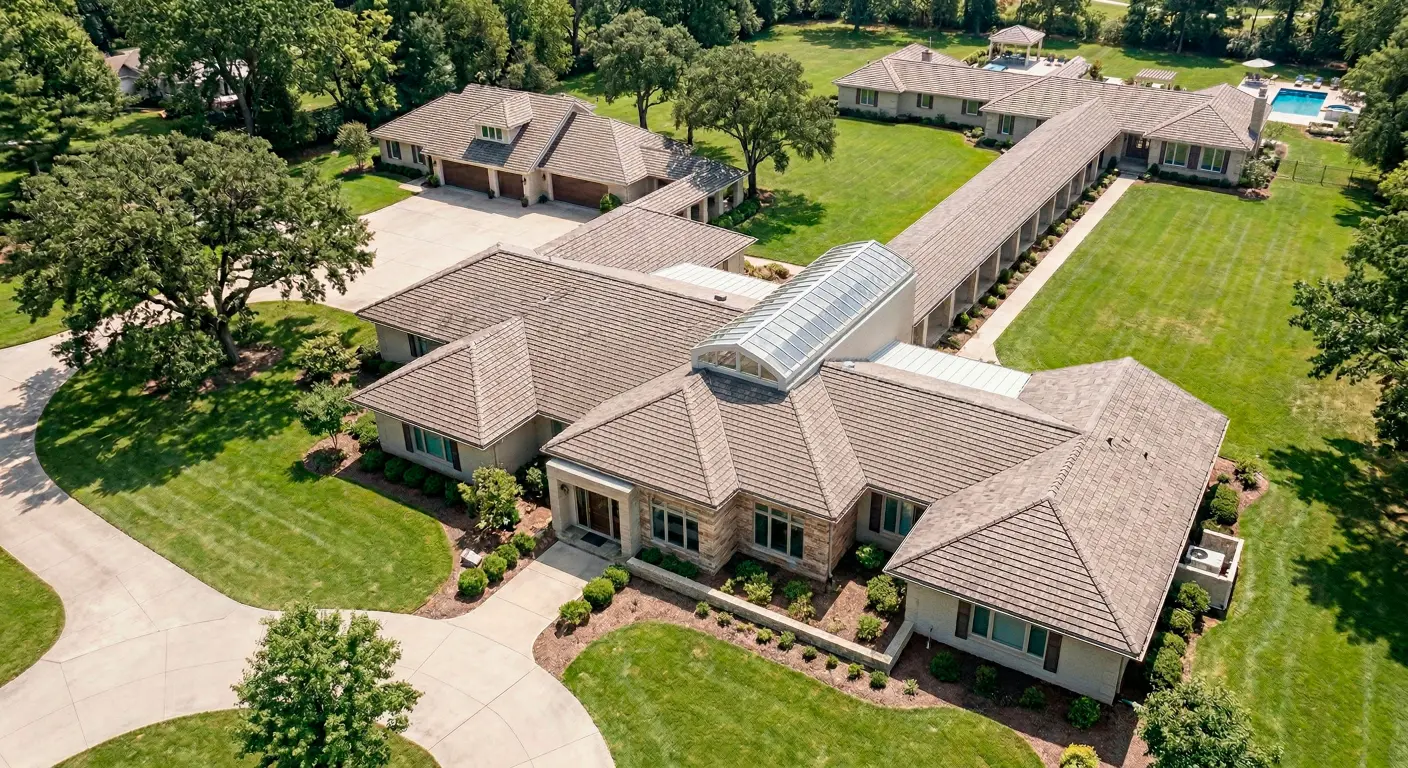
If your Wi-Fi works well in the living room but falls apart in the back bedroom, basement TV area, garage gym, or upstairs office, the problem may not be your internet plan at all. In many long ranch homes and split-level layouts, the real issue is how the home is shaped, how rooms are separated, and where the signal has to travel to reach the places that matter most.
That is why fixing Wi-Fi in long ranch homes and split-level layouts often starts with understanding coverage, not just buying faster service or adding more devices.
This is where many homeowners get stuck. They already have internet. They already have a router. They may have even added a mesh node or extender. Yet video calls still drop in the office at the far end of the house, streaming buffers in the basement, and smart devices in the garage disconnect at random times. The frustration usually comes from trying reasonable fixes that do not match the real cause.
A long ranch house creates one kind of challenge: the signal has to travel horizontally across a wide footprint, often through multiple walls, appliances, and furniture zones. A split-level home creates another: the signal may need to move across level transitions, odd stairwells, partial walls, and rooms that are not stacked or arranged in a simple way. In both cases, coverage gaps tend to show up in predictable places.
The good news is that these problems can usually be thought through in a practical way. Before spending more money on equipment, it helps to understand what the pattern of failure is telling you, why more speed often does not solve it, when mesh helps, and when a better layout plan matters more than another box from a store.
Why Wi-Fi Problems in Ranch and Split-Level Homes Are Often Layout Problems First
It is easy to assume that weak Wi-Fi means weak internet. That is a normal conclusion because the experience feels the same: slow loading, buffering, frozen calls, lagging apps, and devices that seem to hang for no reason. But there is an important difference between internet speed coming into your house and Wi-Fi coverage moving that connection around your house.
A home can have a perfectly adequate internet plan and still perform poorly in the rooms where people actually live and work. If the router is in a utility closet at one end of the house, for example, the connection may test well nearby while the opposite end struggles. If a split-level home places the router in a lower media cabinet, rooms above and across from that point may get only a weak signal by the time it reaches them.
Long horizontal layouts tend to stretch coverage beyond what a single centrally placed router can handle well, especially once real-world obstacles are involved. Split-level homes add another layer of complexity because signal paths are not always straight or open. Instead of traveling cleanly from one point to another, the signal may be reduced by walls, floors, stair structures, storage areas, fireplaces, mechanical spaces, or dense materials between levels.
That is why the layout itself deserves attention early. Homeowners often blame the provider first, then the router brand, then the internet package. But in many cases, the floor plan is the first thing to examine because it shapes how well any Wi-Fi solution can work.
The First Clue: Where the Signal Fails Tells You More Than the Router Brand
One of the most useful questions is not “What router do I need?” but “Where exactly does the signal fail?” The location pattern tells you far more than product names do.
If only one room has trouble, that often points to a localized issue. Maybe the room is tucked behind a series of walls. Maybe it sits over the garage. Maybe it is at the farthest possible edge of a long ranch footprint. Maybe it is in a basement corner where the signal must pass through several barriers before it arrives weak and inconsistent. In those cases, the problem may be less about the entire network and more about how one area is being reached.
If half the house is weak, that usually suggests a broader coverage design issue. In a long ranch home, this may show up as solid performance near the center or router side of the house and steadily worse performance as you move toward the back bedrooms, rear office, or opposite-end den. In a split-level layout, it may look like decent signal on the router’s level but unstable performance on the upper landing, lower family room, or rooms separated by a staircase and partial walls.
Garages and basements are especially revealing. If the attached garage loses Wi-Fi while nearby interior rooms remain usable, distance plus exterior-facing materials may be part of the problem. If the basement streaming area works only sometimes, level transitions and structural barriers may be weakening the signal enough that performance changes with device load, time of day, or even where people are standing.
This is why two homeowners with the same internet plan can have completely different experiences. The failure pattern matters. A back bedroom with no signal tells a different story from a whole rear wing with inconsistent coverage. One suggests a targeted reach problem. The other may suggest the home needs a different distribution strategy altogether.
Why Adding More Internet Speed Usually Does Not Fix Dead Zones
When Wi-Fi feels slow, upgrading internet service can seem like the fastest answer. It is also one of the most common disappointments.
The reason is simple: internet speed and in-home signal delivery are related, but they are not the same thing. Your internet provider brings service to the home. Your Wi-Fi network still has to distribute that connection to the rooms, devices, and activities that depend on it. If that distribution is weak, uneven, or forced through a poor layout, a faster plan may not change much in the room where the problem actually shows up.
Imagine a homeowner with a long ranch house who upgrades from one internet tier to a higher one because video calls keep dropping in the back office. The connection near the router may now test faster, but the back office can still suffer if the signal reaching that part of the house remains weak. The same thing happens in split-level homes where the lower level has good performance and the upper office still struggles. More service does not automatically improve how well the home’s internal network reaches that space.
This is an important misconception to reverse early. A speed upgrade can help if the household truly has too many devices or too little bandwidth overall. But if the main complaint is that certain rooms fail while others work well, coverage design deserves more attention than package size.
That distinction saves money and frustration. It shifts the conversation from “How much faster should I buy?” to “How is the signal getting to the rooms I care about most?” That is usually a better question.
Three Common Causes Behind Coverage Gaps in These Layouts
The first common cause is poor router placement. Many homes end up with the router wherever service first enters the house, not where coverage makes the most sense. That might be a side wall, a mechanical room, a downstairs cabinet, or a back corner near where the provider installed equipment. In a long ranch house, that can force the signal to cover the entire home from one extreme end. In a split-level home, it can leave upper or lower spaces fighting for usable signal from an awkward origin point.
The second cause is distance combined with building materials. Even when a home does not seem especially large on paper, the way rooms are arranged can make the signal path longer and more difficult than expected. A back bedroom behind several walls, a basement room under dense flooring, or a garage beyond insulated or exterior-grade materials can all reduce performance. Homeowners often think of square footage alone, but layout and barriers are just as important.
The third cause is overreliance on wireless hops. This often happens after someone tries to solve the issue with extenders or wireless mesh nodes placed wherever they can plug them in. The intention makes sense, but every added wireless link depends on the quality of the connection feeding it. If a node is already receiving a weak signal, it may extend that weakness rather than solve it. In a long ranch home, a far-end mesh point may still be too far from the previous point to perform well. In a split-level home, the path between levels may be unreliable enough that the added hardware becomes one more unstable link.
These three causes often overlap. A poorly placed router creates a weak starting point. Distance and materials make the path harder. Wireless-only additions try to patch the problem but inherit the same weak signal. That is why piecemeal fixes sometimes make the setup feel more complicated without making it more dependable.
When Mesh Helps—and When It Becomes Another Layer of Frustration
Mesh systems can absolutely help in some homes. They are often a reasonable option when the coverage issue is mild to moderate, the home layout is not too punishing, and the nodes can be placed where they still maintain a healthy connection to one another. For a homeowner with a few problem areas and a mostly open layout, mesh may provide a simpler improvement than starting over.
But mesh is not magic, and that matters in homes with long stretches, tricky level changes, or hard-to-reach rooms. In a long ranch layout, the far bedroom or rear office may be too distant from the main router for a wireless mesh chain to stay strong from end to end. In a split-level home, the signal between levels may weaken enough that the mesh node technically connects but performs inconsistently under real use.
This is where homeowners often feel misled by the promise of easy whole-home coverage. The system may function, but not in the way they hoped. Streaming may improve in one room and still fail in another. A video call may work in the kitchen but freeze in the room above the garage. Smart devices may connect most of the time, then drop at the worst moments.
The hidden tradeoff is backhaul, which is simply the connection that links one network point to another. If the mesh system relies on a weak wireless backhaul, every node is working from a less stable foundation. That does not mean mesh is always the wrong choice. It means mesh works best when placement and signal path still support it.
For homeowners already frustrated by trial and error, that distinction matters. Mesh can be a good fit for mild coverage issues. It becomes another layer of frustration when it is expected to overcome a layout that really needs stronger distribution planning.
A Better Way to Think About Coverage: Access Point Placement and Wired Backhaul
A more useful way to approach these homes is to think less about pushing signal farther from one main box and more about placing coverage where it is actually needed. That is where access point placement becomes important.
An access point is a device that provides Wi-Fi coverage to a specific area of the home. The advantage is not just having more hardware. The real advantage is location. Instead of asking one router to do everything from a poor starting position, the network can be designed so coverage begins closer to the rooms that need it.
In a long ranch home, that might mean placing coverage points to serve opposite ends more intentionally rather than hoping one device reaches through the entire footprint. In a split-level layout, it might mean positioning coverage so that upper and lower living zones each have stronger local service rather than competing for a distant signal source.
Wired backhaul changes the conversation because it gives those coverage points a more stable connection. Rather than depending on one weak wireless hop to feed another, a wired link can support more reliable performance where consistency matters. That is especially valuable in homes with home offices, media rooms, attached garages with connected devices, or multiple people doing bandwidth-heavy activities at the same time.
A professional looking at a long ranch or split-level home may think in room-by-room terms. Where is the office? Where do calls happen? Where are the streaming televisions? Where are the cameras, smart locks, or outdoor devices? Where does the garage sit relative to the rest of the house? Which spaces are separated by dense materials or level changes? Those questions usually lead to better placement decisions than shopping by marketing claims alone.
The result is not necessarily more complexity. In many cases, it is the opposite. Better placement and stronger connections reduce the need for improvised fixes, random extenders, and constant troubleshooting.
Common Mistakes Homeowners Make When Trying to Fix These Layouts
One of the most common mistakes is leaving the router at one extreme end of the house and assuming more internet speed will compensate for it. If the signal starts from a poor location, the rest of the setup is already working uphill.
Another mistake is hiding equipment in cabinets, closets, utility corners, or behind large objects to keep things tidy. That may help visually, but it often hurts coverage. In homes already struggling with distance or room separation, small placement compromises can create larger performance problems.
Many homeowners also rely on extenders as if they are a long-term solution. Extenders can sometimes help in very narrow situations, but they often become part of a patchwork network that feels unpredictable. One room improves, another gets worse, and roaming between areas becomes inconsistent. In a ranch home with a long footprint or a split-level home with awkward transitions, that patchwork can become frustrating quickly.
Another common issue is mixing multiple Wi-Fi products without a real plan. A homeowner may keep the provider’s router, add one mesh unit, later install an extender, and then move devices around whenever performance dips. Each change is understandable on its own, but together they can create confusion about what is actually helping and what is creating new problems.
There is also a more subtle mistake: solving for the wrong room. Some people focus on the place where the network equipment sits rather than the rooms that matter most. But a networking plan should follow daily life. If the back bedroom is used as an office, the basement is the main TV space, and the garage holds connected equipment, those are the areas that deserve priority in the design.
What to Check Before You Spend More Money
Before buying new hardware or upgrading service, it helps to step back and take inventory of what the home actually needs.
Start with the rooms that matter most. Which spaces need reliable performance every day? A kitchen phone signal issue may be annoying, but a rear office with dropped work calls is a higher priority. A guest room may not matter as much as the basement family room where everyone streams at night. This ranking helps separate a nice-to-have improvement from a real coverage priority.
Next, look at the devices and activities involved. Are you trying to support video meetings, streaming, gaming, smart TVs, cameras, thermostats, locks, tablets, and laptops across different ends of the house? The answer affects how forgiving the setup can be. Light browsing in a spare room is different from high-reliability work use in a far-end office.
It also helps to note where dead zones happen and when. Is the garage always weak, or only in the evenings? Does the upstairs office fail only during calls? Does the basement TV buffer only when several devices are active? These patterns can reveal whether the issue is localized coverage, network congestion, or a combination of both.
Finally, gather simple evidence before assuming the provider is at fault. If performance is strong near the router but consistently weak in specific rooms, that points more toward layout and distribution. If the whole house slows at the same time regardless of room, that may suggest a broader service or load issue. The goal is not to run a perfect technical audit on your own. It is to separate “the internet is bad everywhere” from “the signal is not reaching key areas well.”
That distinction makes your next decision much smarter. It helps you avoid replacing the wrong thing.
What a Low-Friction Next Step Looks Like
Some homeowners can improve performance with a few practical changes. If the current router is hidden, trapped at one far end of the home, or positioned in a poor spot relative to the rooms that matter, moving it to a more central or open location may help. Simplifying a cluttered setup can also reduce confusion. In a few cases, a mild coverage issue may respond well to better placement alone.
But when the home layout is the real obstacle, there is a point where guesswork becomes expensive. That is often the moment to get a professional networking assessment. Not because the problem is mysterious, but because the solution needs to match the shape of the house, the priority rooms, and the way the network is actually used.
A thoughtful assessment can help answer practical questions: Is this a placement problem, a single-room reach problem, or a broader coverage design problem? Would mesh realistically help here, or would it inherit the same weaknesses? Would access points placed more intentionally make a bigger difference? Is wired backhaul worth considering for the office, basement, or garage side of the house?
If your ranch home or split-level layout still has rooms with weak or missing signal, the problem may be the design of the network—not just the internet service. AVI Group can help assess how your layout, access point placement, and distribution strategy affect coverage. Book a free consultation to talk through a smarter, room-by-room solution tailored to your home.
FAQ Content
Why does Wi-Fi fail in the back rooms of a long ranch house?
Back rooms in a long ranch house often sit at the far end of the coverage path. By the time the signal reaches them, it may already be weakened by distance, walls, furniture zones, and other barriers. If the router is placed near one end of the house, the problem usually becomes more noticeable.
What is the best Wi-Fi setup for a split-level home?
The best Wi-Fi setup for a split-level home depends on where signal problems happen and which rooms matter most. In many cases, a better result comes from thoughtful access point placement rather than relying on a single router. Homes with more difficult level transitions may benefit from a design that distributes coverage more intentionally.
Where should access points go in a ranch-style house?
Access points in a ranch-style house should generally be placed based on the rooms that need reliable coverage, not just where it is convenient to plug something in. The goal is to support the living areas, offices, bedrooms, garages, or media spaces that struggle most, while reducing long weak stretches across the home.
Why is mesh Wi-Fi not reaching my back rooms?
Mesh Wi-Fi may not reach back rooms well if the node feeding that area is already receiving a weak signal itself. In long ranch homes and some split-level layouts, the distance or room separation can make wireless backhaul less dependable. In that case, the system may connect on paper but still perform inconsistently in daily use.
Can Wi-Fi cover a basement and garage reliably?
Yes, Wi-Fi can cover a basement and garage reliably in many homes, but those areas are often harder to serve than central living spaces. Their location, materials, and separation from the main router matter. A layout-specific approach usually works better than assuming a single router will cover everything evenly.
Does upgrading my internet speed fix Wi-Fi dead zones?
Not usually. Upgrading internet speed may help if the household truly needs more bandwidth overall, but it does not automatically solve dead zones inside the house. If the main problem is that only certain rooms have weak or missing signal, coverage design is often the more important issue.
If your ranch home or split-level layout still has rooms with weak or missing signal, the problem may be the design of the network—not just the internet service.
AVI Group can help assess how your layout, access point placement, and distribution strategy affect coverage.
Book a free consultation to talk through a smarter, room-by-room solution tailored to your home.
RELATED LINK: